ROS2笔记

1
2
3
4
5
wget http://fishros.com/install -O fishros && . fishros
鱼香的一键命令

RCM(待研究)
https://gitee.com/ncnynl/commands

概念

image.png
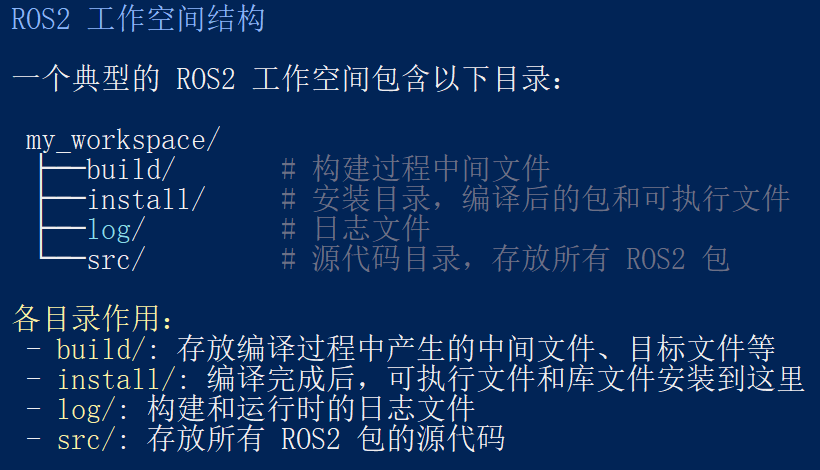
然后功能包就是放在src下面
image.png

1
2
3
4
5
6
7
8
9
10
11
12
13
14
15
16
17
18
19
典型工作流程

# 1. 创建工作空间,ros2_ws
mkdir -p ~/ros2_ws/src
cd ~/ros2_ws

# 2. 创建包
cd src
ros2 pkg create --build-type ament_cmake my_package

# 3. 编译,在工作空间的目录下进行
cd ..
colcon build

# 4. 设置环境
source install/setup.bash

# 5. 运行节点
ros2 run my_package my_node

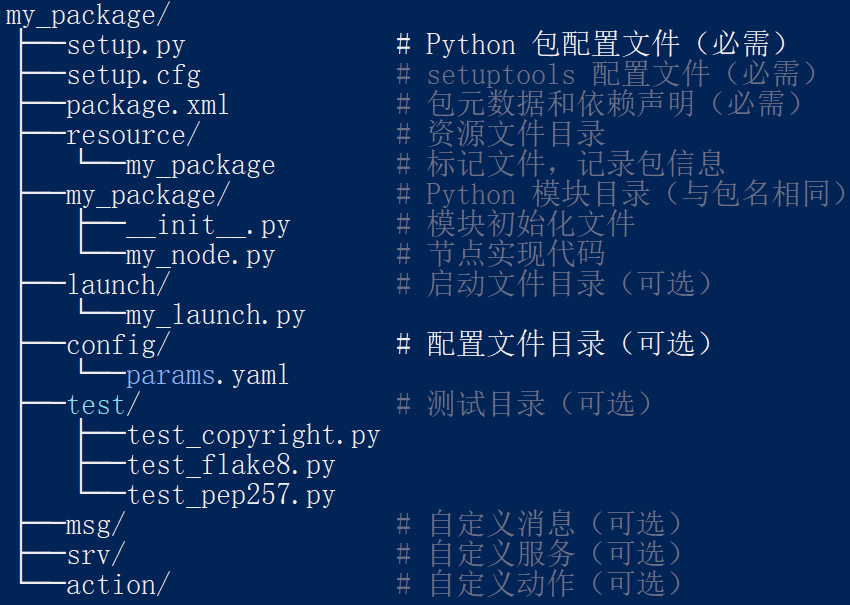
创建一个Python功能包

1
ros2 pkg create example_py --build-type ament_python --dependencies rclpy
1
2
3
4
5
6
7
8
ros2 pkg create <package_name> --build-type <build-type> --dependencies <dependencies> --node-name <node-name>

pkg:表示功能包相关的功能;
create:表示创建功能包;
package_name:新建功能包的名字;
build-type:表示新创建的功能包是C++还是Python的,如果使用C++或者C,那这里就跟ament_cmake,如果使用Python,就跟ament_python;
dependencies:表示功能包的依赖项,C++功能包需包含rclcpp,Python功能包需包含rclpy ,还有其它需要的依赖;
node-name:可执行程序的名称,会自动生成对应的源文件并生成配置文件;

常用命令

1
2
3
4
5
6
7
8
查看主题
ros2 topic list

查看特定主题的详细信息
ros2 topic info <topic_name>

查看主题的实时数据
ros2 topic echo <topic_name>

rosdep 命令